

Discover the complete architecture of Microsoft Copilot Studio for creating intelligent copilots integrated with Power Platform, Azure OpenAI, and Dynamics 365. Boost your business processes with conversational AI!
Introduction
Artificial intelligence is revolutionizing business productivity. With Microsoft Copilot Studio, you can create custom AI assistants without coding. But behind its user-friendly interface lies a sophisticated architecture that orchestrates generative AI, automation, and business integration.
In this article, explore the architecture of Copilot Studio and learn how to build powerful copilots to transform your business.
What is Microsoft Copilot Studio?
Copilot Studio is the evolution of Power Virtual Agents within the Power Platform. It allows you to design copilots capable of:
- Understanding natural language,
- Triggering automation,
- Integrating with your business systems (Microsoft 365, Dynamics 365, Dataverse, etc.).
Thanks to Azure OpenAI, Copilot Studio uses generative AI to enhance its responses and streamline the user experience.
Overview of Copilot Studio Architecture
Creating an effective copilot relies on a robust and modular architecture. Here’s how Copilot Studio’s architecture is structured:
Architecture Diagram:
Logical Architecture of Copilot Studio
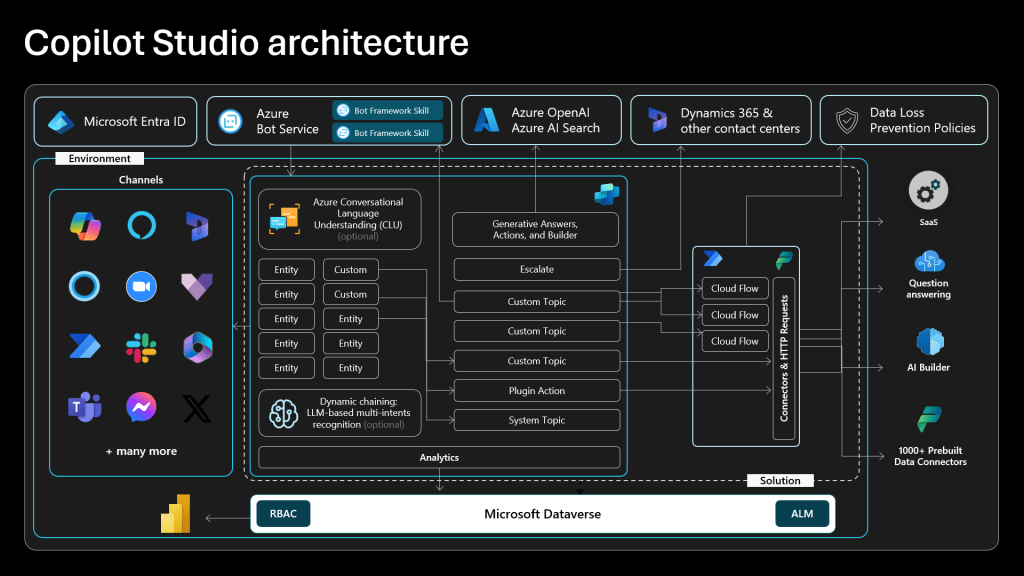
Key Components of Copilot Studio Architecture
- Low-Code Creation Interface
- Visual construction of dialogs.
- Definition of prompts, flows, and connectors.
- AI Orchestrator
- Analyzes each user request.
- Chooses the best strategy: generative AI, automated action, or querying a database.
- Azure OpenAI Integration
- Uses GPT models to generate natural and contextualized responses.
- Power Platform Connectors & Plugins
- Links to Dynamics 365, Dataverse, SQL Server, SharePoint, Salesforce, and more.
- Develops custom plugins via secure APIs.
Lifecycle of a Request in Copilot Studio
- The user formulates a request.
- Copilot Studio sends it to the Prompt Orchestration Layer.
- The orchestrator:
- Activates GPT for an AI-generated response,
- Triggers a Power Automate flow to execute a business action,
- Or queries your databases directly.
- An enriched response is generated.
- The response is returned to the user in their environment (Teams, website, etc.).
Security and Governance in Copilot Studio
Microsoft Copilot Studio is designed to meet the most demanding standards:
- Secure authentication with Microsoft Entra ID (formerly Azure Active Directory).
- Detailed audit logs.
- Control over data privacy used in prompts.
- GDPR compliance ensured.
Real-World Application Examples
- HR Copilot: Answers employee questions about leave and integrates with Dynamics 365 HR.
- Customer Service Copilot: Searches knowledge bases and automatically creates tickets.
- Finance Copilot: Extracts financial KPIs directly from Power BI or Dataverse.
Best Practices for Optimizing Your Copilot Studio
- Modularize your flows for greater flexibility.
- Set up fallback prompts in case of failure.
- Monitor conversational performance using built-in analytics.
- Train your prompts to match specific business needs.
Conclusion: Why Mastering Copilot Studio Architecture is Key?
The Copilot Studio Architecture represents much more than just a tool for creating virtual assistants.
It is a complete AI orchestration platform offering customization, scalability, and security.
By understanding this architecture, you will be able to:
- Design truly useful copilots,
- Accelerate your business processes,
- Deliver highly personalized AI experiences.
🚀 Ready to design your own Copilot? Discover Microsoft Copilot Studio and get started today!
Quick FAQ on Copilot Studio Architecture
- How does Microsoft Copilot Studio architecture work?
Copilot Studio uses an AI orchestration layer to dynamically select the best response (GPT, database, or automated action) based on each user request. - Is Copilot Studio secure?
Yes, it relies on Microsoft Entra ID for identity management and includes comprehensive audits for GDPR compliance. - Can I integrate custom APIs into Copilot Studio?
Absolutely. Thanks to custom plugins, you can securely integrate any external service.
 MasterDataDNA
Leave a comment